- Very early documentation
What Is A Space?
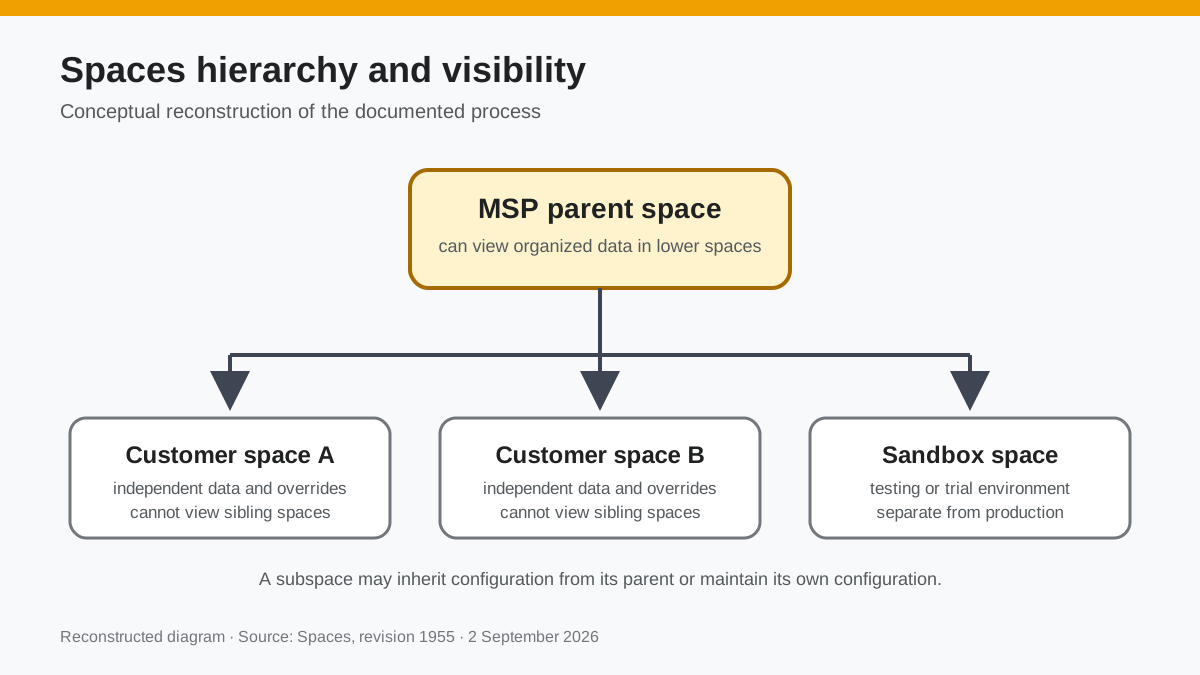
- A space is an instance of the Dreamtsoft platform, multiple spaces can exist.
- Each space can have its own independent configurations on bundles, components, pages, UI, bucket data, etc...
General Use Cases
- MSPs can utilize spaces to organize and separate data and processes, essentially giving every customer a unique instance/environment.
- Developers can use utilize spaces to have sandbox/testing/trial instances/environments, disconnected from any production space.
- View organized data of lower spaces from a higher space.
What Is A Subspace?
 Documentation image “Subspace.png” is unavailable.
 - A subspace is an instance that is hierarchically lower than a parent space. For example, a MSP has multiple subspaces for their customers, which all may look and behave different, the MSP space is able to look down at all customer spaces, whereas a customer space cannot view other customers spaces.
- A subspace can have its own configurations, but can also inherit configurations from the parent space.
Creating A Basic Space
 Documentation image “CreatingASpace_1.png” is unavailable.
  Documentation image “CreatingASpace_2.png” is unavailable.
  Documentation image “CreatingASpace_3.png” is unavailable.
  Documentation image “CreatingASpace_4.png” is unavailable.
  Documentation image “CreatingASpace_5.png” is unavailable.
  Documentation image “CreatingASpace_6.png” is unavailable.
  Documentation image “CreatingASpace_7.png” is unavailable.
 Managing A Spaces Bundles
There are two different ways of adding a bundle to a space. Majority of the time, subscribing to a bundle is the way to go, as it will copy the bundle configurations of the space above it, including any changes made in the future, making it easy to tweak with overrides and save time reconfiguring the bundle. Installing a bundle will allow you to start from a clean slate, with the default configurations Dreamtsoft made them with.
- Subscribing to a bundle will disable the admin file editing on the subscribed bundle.
Subscribe To A Bundle
To make a space subscribe to a bundle, first go to your space tree. Select the dropdown on the space you'd like to subscribe the bundle to, then select 'Manage Bundles':
 Documentation image “SubscribingToBundle.png” is unavailable.
  Documentation image “SubscribingToBundle1.png” is unavailable.
 The bundles that are shown on any given space are the bundles the parent space has installed. In the picture above, three bundles are listed: Service Management, System, and Work. Here you can see the parent space has access to other bundles, but only has those three installed:
 Documentation image “SubscribingToBundle2.png” is unavailable.
 Install A Bundle
To install a bundle on a space, press Option+W (Alt+W on Windows/Linux) on any page in the space you'd like to install the bundle to. The slide-out that comes out is a list of installed/subscribed bundles the space currently has. You can install a new bundle by pressing the + button at the top right:
 Documentation image “InstallingBundle1.jpg” is unavailable.
 - To install published bundles from Dreamtsoft, select install a bundle from the store.
- To install published bundles from a third party, select install a bundle from a URL. You will need to have access to clone the git repository the bundle is from using either: a user/pass or a private SSH key.
Spaces.js Module
Reconstructed diagram
Reconstructed diagram: a conceptual visualization of the process described on this page.